vidPhen
An interactive terminal downloader for videos, playlists and subtitles, wrapping yt-dlp and ffmpeg with menus built from the formats each link actually offers.
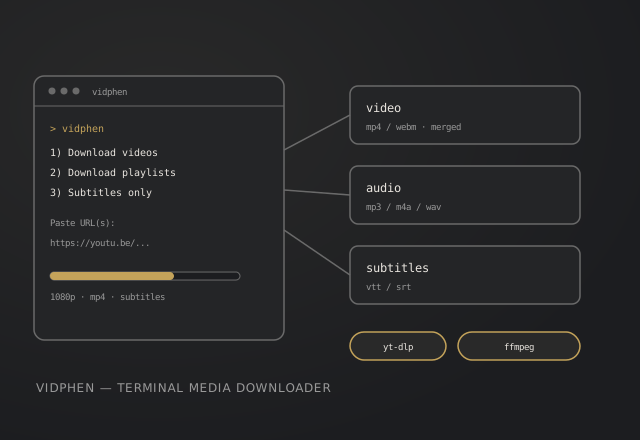
Overview
yt-dlp is powerful, but its flag surface is enormous. vidPhen turns the common jobs into a menu: paste one or many links, preview titles and durations, pick quality and subtitles from the formats the link actually exposes, then download. It remembers your folder and checks Python, yt-dlp and ffmpeg before the first run.
vidphen
1) Download videos -> quality -> subtitles -> folder
2) Download playlists -> scope E / R / S -> batch options
3) Download subtitles -> language -> .vtt / .srt
4) Settings -> folder, config, yt-dlp update
Key features
- Three flowsVideos, playlists, or subtitles only, with no flags to memorise.
- Dynamic menusQuality and subtitle choices are built from the extracted formats, not a fixed list.
- Batch controlSame for all or pick per video, with playlist ranges such as
2 to 19. - Preview firstTitles, durations and playlist counts before anything downloads.
- After the runOpen the download folder or the file that just finished.
- Doctor + updatesStartup dependency check and a single step yt-dlp update.
How it works
- Install with
pip install -e .(or straight from GitHub). - Run
vidphen; the first launch asks for a download folder and checks the toolchain. - Pick a flow, paste one URL per line, confirm the preview, then choose quality and subtitles.
git clone https://github.com/PhenPen/vidPhen.git
cd vidPhen
pip install -e .
vidphen
# ffmpeg is only needed for merges (1080p+) and audio converts
winget install Gyan.FFmpeg # Windows
brew install ffmpeg # macOS
Stack
Python 3.9+
yt-dlp
ffmpeg
stdlib